
Basics:
- Arrow keys or WASD to move.
- Press E to use objects.
- Press i to access inventory.
- You can click an inventory item to equip it (makes it active item).
- Press spacebar to use the active item (ie, use sword).
- Use the sword on enemies to get cash to spend in the shop (press H to access shop).
Building:
- Talk to Draco in Root to learn how to build
Commands:
- /home – respawn at your homestone
- /root – respawn at city of Root
- /sign <text> – rename the sign you are looking at
- /redeem <code> – redeem a code
- /who – see who is online.
- /trade <username> – start trade with someone.
- /w <player name> <message> – Sends a private whisper message to player name.
- /ignore <player name> – toggle ignore status on another player
- /rewardblocks – see your progress on finding reward blocks.
- /me <text here> – emotes this text as an action.
- /global <text here> – send a message to all players
- /g <text here> – send a message to all players
- /nearby <text here> – send a message to all nearby player
- /n <text here> – send a message to all nearby player
- /friend – get information about friend list
- /color <1-9> – changes your color
- /sellallinv – sell all your inventory items.
- /homeinvite <player name> – Invite another player to visit your homestone
- /visit <player name> – Visit player’s homestone (requires invite)
- /leveldoor <minimum level> – set minimum level for a level door.
- /homestoneretrieve – returns your homestone to your inventory
- /nukekeys – delete all keys from your inventory
- /clearquests – deletes all quests from the quest window
- /loc – prints your current location
- /gold – displays information about current gold cycle
- /telepad <telepad ID> – links telepad to telepad id
- /togglemapprivacy – first travel to your pocket universe, then execute this command. It will toggle whether your pocket universe will be visible on the map — does not take effect until next time map is generated
- /regionstat – show how many blocks are in your current region
- /checkpoint (or /ch) – manually respawn to your most recent checkpoint
- /townexpand – (Mayor/Official/Vice Mayor Only) Expand the size of your town (costs plat)
- /townname <town name> – (Mayor Only) Names your town
- /townadd <player name> – (Mayor/Vice Mayor Only) Adds a citizen
- /towndel <player name> – (Mayor/Vice Mayor Only) Removes a citizen
- /towninfo – Gets information about the town you are in
- /towntele <town name> – (Citizen only) Teleport to town stone
- /townoff <citizen name> – (Mayor/Vice Mayor only) Toggle Town Official status for a citizen
- /townvicemayor <player name> – (Mayor Only) Toggle’s citizen vice mayor status.
- /townpvp (off OR on OR bounty OR dungeon) – (Mayor/Official/Vice Mayor only) Toggle PvP status of town.
- /towntransfer <player name> – (Mayor Only) Transfers ownership of town to target player
- /towns – Show list of all towns on this server that you are the mayor of, and their location.
- /townupgrade – (Mayor/Official/Vice Mayor Only) Upgrade your pocket townstone to a full townstone
- /friend add <username>
- /friend remove <username>
- /friend list (or /f)
- /safe open <password> (or /safe 0 <password>
- /safe close (or /safe c)
- /safe count
- /safe deposit <amount> (or /safe d <amount>)
- /safe withdraw <amount> (or /safe w <amount>)
- /safe pw <password>
- /safe owneropen
- /rewardblockname <name>
- /rewardblockquest <quest text>
- /rewardblock quest (non public rewardblock)
- /publicpad tele <location name> (or the obvious /tele <location name>
- /publicpad list
- /publicpad name <location name>
- /tele <name> – teleport to named publicpad
- /publicpad list – list all publicpads
- /publicpad help – gets list of publicpad commands
- /fdo OR /feedoor open
- /feedoor fee <price>
- /listpockets – get a list of your pocket universes, showing the map id for each
- /telepocket <map id> – Teleport to one of your pocket universes, ie: /telepocket 123456
- /buypocket – purchases a new pocket universe for 10p. Pocket will be a standard new pocket (2×2 regions big with no townstone placed yet).
- /passworddoor open <password> – Opens password door.
- /passworddoor set <password> – (Owner only) Sets password.
How do I get a log file to get more information about my error?
“Please wait… connecting to 8BitMMO servers…” on Server Select screen
If this message is displayed forever, it indicates there is a problem accessing the 8BitMMO servers.
- There could be a firewall preventing access to the servers
- There could be Windows Safety Filter preventing access to the servers
- Especially for standalone version, you could be using an old version of the launcher which does not have the most current certificates. (If you are using standalone version prior to July 10, 2026, you must update.)
- If you are launching the game directly not using the batch script provided, you could be using a version of Java that does not include our certificate. In which case, you should either use the provided Java, or add the certificate longcert.crt to your java’s certificate store.
ERROR>java.lang.UnsatisfiedLinkError: C:\Users\NAME\AppData\Roaming\8BitMMO\Clients\2f4a8472\SteamGlue.dll: Can’t find dependent libraries
Could be several things, but the most likely solutions to try:
– Reboot (sometimes it’s that easy)
– Disable antivirus (could be preventing DLL load)
– Verify game integrity cache
– Uninstall, delete %APPDATA%\8BitMMO, reinstall
My bet is on the antivirus, but try each. Good luck!
Error: Could not get Steam Auth Ticket, or:
[WARNING] We had to give up waiting for steam auth ticket to be ready
If in your log file, this manifests as the line “[WARNING] We had to give up waiting for steam auth ticket to be ready” in your game log, this indicates that Steam’s Auth servers are currently down. Please retry later.
Also, you can try these tips:
- If you are running the Steam build, please make sure Steam is actually running and you are logged in.
- Disable antivirus / parental controls (some have been causing the steam auth DLL’s to not load) and try running again.
- Ensure game is not currently running. Then in Steam, right click 8BitMMO -> Properties. Choose Local Files tab. Click Verify Integrity of Game Cache. Try running the game again after this is complete.
Could not copy steam dlls.
java.io.FileNotFoundException: C:\Users\<username>\AppData\Roaming\8BitMMO\Clients\2f4a8472\steam_api.dll (Access denied)
“Oops! A download error occurred”
Try closing the game and deleting %appdata%\8BitMMO
Where is my plat credited for purchases?
Plat is a universal currency, accessible from all servers.
Where are my gold & hats credited for in-game pack purchases?
Gold & Hats are server-specific, and credited to the server you are playing on when you make the purchase (or if not online, then the one most recently connected to). They are credited instantly, as long as you complete the Steam purchase.
Where are my gold & hats credited for Steam Founder’s Pack purchases?
Gold & Hats are server-specific. They are credited when the launcher is first started up. They will be delivered to the last server you played on prior to restarting the launcher.
How do I wear my Steam Founder Hat(s)?
Logon to the server where your purchase was credited (see above answer). Then Menu > Shop > Clothing > Hats > Use your new Hat
When game is launched, only a black screen is shown
This can happen when certain overlays interfere with the game. Try turning off Mumble Overlay, teamspeak overlays, or anything else that would interfere with rendering.
Steam overlay DOES work though, so feel free to leave that on 🙂
“Error: Trouble getting latest launcher version online.”
This error indicates the launcher is unable to download its configuration file. Here is how to resolve this:
- Try re-launching the game from Steam or your Desktop — it is possible that the error was only a temporary network error
- Make sure you are not behind a network proxy
- Turn off any firewall that would be interfering with the ability for the launcher to download a file
“Authenticating with Steam, Please Wait…” shows forever
This problem indicates there is an issue logging into Steam. Here are a few methods to resolve this error:
- Try closing the launcher and run the game again – maybe it was a temporary error. This error will also be shown when Steam API servers are down.
- If you are running the Steam build, please make sure Steam is actually running and you are logged in.
- Disable antivirus / parental controls (some have been causing the steam auth DLL’s to not load) and try running again.
- Ensure game is not currently running. Then in Steam, right click 8BitMMO -> Properties. Choose Local Files tab. Click Verify Integrity of Game Cache. Try running the game again after this is complete.
Can I make a YouTube let’s play video?
For sure! However, I would humbly ask two things:
A) Please keep in mind the game is still a work in progress – you might find bugs, and I still plan on adding more content and features to the game.
B) You can monetize the video with ads. But if you’re able to avoid it, I’d very much appreciate if you didn’t. I do want YouTube Let’s Play Broadcasters to be successful and to earn a fair wage for their work — I love what you guys do. But I also loathe advertising with the passion of a thousand suns. So if you can skip the ads, awesome, but if you have to put them in, then that’s okay too.
java.net.SocketException: Permission denied: connect
Disable Norton or other firewall / virus
450 // Blocked by WPC
You need to disable Windows Parental Controls in order to play.
Problem parsing steam login JSON. This was received: . . . window.location.replace(‘http://fss.live.com/krl/block.aspx
You need to disable Microsoft Family Safety in order to play.
Couldn’t get I/O for the connection to: core.8bitmmo.net because Invalid argument: connect
Try updating your network drivers, especially if you have an Alienware Laptop. Details.
How to Install 8BitMMO on 64-bit Ubuntu
UPDATE: There is now a native 64bit client — these steps should no longer be necessary.
You may get this error in your log initially when running on 64-bit Ubuntu:
ERROR: ld.so: object '/home/user/.local/share/Steam/ubuntu12_64/gameoverlayrenderer.so' from LD_PRELOAD cannot be preloaded (wrong ELF class: ELFCLASS64): ignored.
Exception in thread "main" java.lang.RuntimeException: java.lang.UnsatisfiedLinkError: /home/user/.local/share/Steam/SteamApps/common/8BitMMO/jre/lib/i386/libglass.so: libgtk-x11-2.0.so.0: cannot open shared object file: No such file or directory
    at com.sun.javafx.tk.quantum.QuantumToolkit.startup(QuantumToolkit.java:284)
Don’t worry — 64-bit Ubuntu just requires some additional libraries.
On older Ubuntu, you can just run:
sudo apt-get install libgtk2.0-0:i386
sudo apt-get install ia32-libs
On Ubuntu 14.04, you will need to run:
sudo -i
cd /etc/apt/sources.list.d
echo "deb http://archive.ubuntu.com/ubuntu/ precise main restricted universe multiverse" >ia32-libs-precise.list
apt-get update
apt-get install ia32-libs
The game should now launch okay.
Web links (ie Menu > Map, or buying gold) do not work in Steam Linux version
Ensure you have libgnome2-0 installed. Details
How do I become a Game Moderator?
Be recommended by one of the current Game Moderators. Generally to be eligible, you need to be consistently active for several months, and have demonstrated a history of helping new players.
Java.Lang.ClassNotFoundException
- Close 8BitMMO completely
- Go to %appdata%
- Delete your 8BitMMO folder (all of your game progress is safe)
- Re-open the 8BitMMO client, it should redownload
I’m having weird Java issues / it says I’m missing a plugin
Here’s a list of things to check:
- Try restarting your browser.
- Bring up task explorer (CTRL + SHIFT + ESC) and killing any Java instances, then refresh the page
- Please install Java from Java.com. You’ll want to use the latest version of Sun Java 6. Java 7 is currently in developer preview, and doesn’t consistently work with the game yet.
- If you’re using non-Sun java, that also could be an issue
- If your browser says you don’t have the Java plugin but you did install it, check to see if you’re using the 64bit version inside a 32bit browser. One user had this issue in Chrome, and resolved it by installing the 32bit Java instead of 64bit Java
- Try a reboot, especially if you just installed java, or changed java versions. This has helped in at least one case and saved hours of troubleshooting.
It says my Java is old
Please make sure you have installed the latest Java 6 available. Java 7 should also work (no guarantees on that yet though). On Windows, head over to Java.com to get the latest version. On Mac this can be tricky, but try this video tutorial and let me know if that works. For Linux, please consult the documentation for your distro on how to install/get the latest Java.
It says my Game Client is old and I need to clear my cache?
Try clearing your browser cache & restarting your browser. Failing that, try a full system reboot.
When I load the game, all I see is a white screen
Try the steps above for weird Java issues. Most likely you need to restart your browser or task kill any java instances (CTRL + SHIFT + ESC) and refresh the page.
I just joined the game, how do I get out of this room?
Check the quests window to see your next steps — it’s on the right of the screen. Menu > Quests to see it if you closed it previously.
How do I open doors / talk to NPCs?
Press E while standing near them.
How do I sword?
Spacebar
I lost my sword somehow!
Go to Menu > Shop, and buy a new sword. If you’re out of gold somehow, ask someone to give you a sword.
Help, what do I do now?
Check your quests window on the right to see your next steps. Talk to the NPCs at the spawn point to get quests.
How do I build? How do I place blocks?
Talk to Draco at the spawn point. He’ll give you a bunch of quests that’ll teach you step by step how to build.
How do I access the menu?
It’s at the top left of the screen. Just hover over it with your mouse and it’ll roll down the options
How do I get gold?
Slay LawyerCats!
Where do I slay LawyerCats / where is the wild areas I can build in?
Take the wildepad telepad at the top right of root to teleport to a random area on the edge of the wilderness.
Here’s the shortest path to buildable territory (step by step guide)
- (After you have completed the tutorial)
- Menu > Respawn (root)
- Go right to the purple telepad and use it
- You are now in your own Pocket Universe! Have fun building!
- Bonus step: Talk to Draco in Root, he’ll teach you how to build
Help, I’m stuck!
Go to Menu > Respawn
How do I close all windows (inventory, shop, etc)
Press ESC
How do towns work? I want to be a mayor
Awesome! read the HOWTO, or watch the vlog.
I want to join a town!
You’ll have to find a mayor and get them to add you to the town. OR, start your own town! (see above question)
Why can I sometimes steal grass?
Dark green grass is ‘free’ grass. Anyone can pick it up and place it
Light green grass is artificial grass – it is owned, and cannot be griefed. Grass bought from the shop is this artificial / protected grass.
I am going to steal all the grass!
You know you can’t sell grass, right? Whatever, have fun 🙂
2013 UPDATE: People took all the grass, and now the ‘free’ grass is incredibly valuable to trade to other players due to its rarity. Hah!
I have an idea / I found a bug
Please post it in the suggestion box so I can keep track of it!
How do I write on a sign?
Type /sign blah in the chat window while standing near it. Talk to Draco nearing the spawning point to learn more.
Where am I?
Easy answer: Menu > Map
Hard answer: If you type /loc it will list your position. IE, it’ll show something like ‘128,128,128:2,3=65′. The part in bold, between the : and the = is the most important part. These are your region coordinates and indicate what x,y chunk of the world you are in. You start the game roughly at 0,0, and as you move east/right the x value gets bigger. As you move south/down, the y value gets bigger.
Where’s my stuff?
If you forgot where you placed your items, launch the map via Menu > Map. From there, click “Where’s My Stuff?”
I’m having random lag spikes / anything I can do to help performance?
Try toggling off lighting in Menu > Options (or just press T). You can also toggle off all heavy processing with SHIFT+T, at the loss of lighting & outlining.
If your lag is network related, try turning off bittorrent, or any other heavy network utilization programs.
How do I trade?
Check out this post on trading
How do I change my color?
Type /color <number> in the chat window, where number is between 1-9.
What client build am I running?
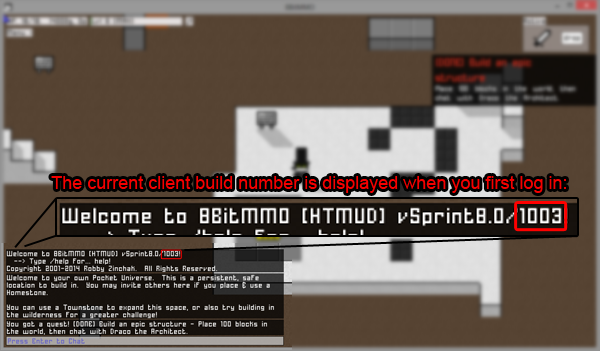
How do I get the latest client build?
Steam or Desktop Edition: Simply join a server from the launcher — your client will be checked to ensure it is the latest version.
Kongregate or Browser Edition: Restart your browser — if that fails to get the latest version, clear your browser’s cache, then perform a full system restart.
Why is there no jump key?
I have another question / I need help from a Game Moderator
Check this page for links to forums & the support system.

Just fyi, OpenJDK v1.6.0.0 (the runtime) and IcedTea-web v1.2 (the browser plugin) work fine for me on Fedora.
Of course, ymmv depending on the version and any down-stream patches that have been applied. It’s generally been pretty solid for me though, and it’s been improving gradually.
Awesome! I was concerned there might be performance or compatibility issues with it
I have some problems whit Java.
I have Java,but I can’t play the game.
I saw the FAQ so much times but I not see what is the solution for my problem.
Help me!
Sorry to hear you are having trouble. If you have installed Java, but it seems to think you don’t have Java, this is a pretty good bet:
If your browser says you don’t have the Java plugin but you did install it, check to see if you’re using the 64bit version inside a 32bit browser. One user had this issue in Chrome, and resolved it by installing the 32bit Java instead of 64bit Java
Me TOO!!!!
How do I save my game? I cant seem to save my game…
The server saves automatically, so you don’t have to save it yourself
Hello … i actually have a problem, every time i click “Click here to play! its free” It just closes and opens again the Tab, if i click it again it closes and opens again and sometimes it just gets a error and does not go back to the main page. I must change of Browser or something…?
Hmm, do you have javascript enabled?
How do you get HP back?
Currently there is no way to do so other than death, but I am planning in the future.
How do I start?I have java, but i can’t go on it just says to come here nothing happens
If your browser says you don’t have the Java plugin but you did install it, check to see if you’re using the 64bit version inside a 32bit browser. One user had this issue in Chrome, and resolved it by installing the 32bit Java instead of 64bit Java
what in the world are ya talkin about??!!
how to place blocks?
Talk to Draco NPC next to the respawn point — his quests will teach you all about building 🙂
how to post on signs?
Type /sign blah in the chat window while standing near it. Talk to Draco nearing the spawning point to learn more.
how do you get platinum besides kreds?
Platinum is a purchase-only currency to support the cost of development, although some players will trade platinum-costing items in exchange for gold.
I have a windows computer that doesn’t already have Java SE6/Sun6, and I tried to download it but I’m not sure what I’m supposed to download… Is there a general download, or do you have to download multiple specific kits?
I meant to say mac computer, jeez.
Unfortunately I don’t have a Mac, so I can’t give any specific advice here. I’d recommend googling around for some tutorials on it.
JRE to Run , JDK is to make. uhh, SE, probably. EE is special.
If you go here: https://www.java.com/en/download/manual.jsp there is only one for Mac. Req’s Lion 10.7.3, mine (10.5) came with, so it was probably 10.7 that didn’t. So that’s the one.
Apple vets Java for Mac, so on occasion, it is really far behind the windows one, but you’ll get updates through Apple’s Software Update.
Thanks for the info!
how do you make both towns and cities?
Please see this post: http://blog.8bitmmo.net/2012/01/towns-are-live-howtofaq/
when i join after a few seconds it disconnects!!! why? D:
Oh, that’s weird. Is it still happening now? Might have been a weird net issue.
oh… thx 😀 lol… i still dont get why there is a net issue… oh well, gotta carry on with fixing the glitches dont u? lol 😀
Here’s a new one to add: Where’s my logout button? -.-
While I’m at it, a linky so I can sign in with my fav IRC client, instead o’ your Javascripty webpage? I’m thinkin’ Pidgin IM, but ChatZilla in browser if you need the https cert.
What? Logout? Why would you ever want to do that? 😛
Hehe, but FYI the IRC network is irc.editingarchive.com #8bit and #8bit-gamewatch — feel free to use whichever client you like. I use YChat (x-chat variant) myself 😉
I have Java installed to the latest version, but it still doesn’t say i have it on my computer.No other earlier versions are in the folder and it just won’t let me play!
Hmmm, might be a 32bit vs 64bit issue? http://8bitmmo.net/help — or on some macs, apple isn’t updating the Java anymore 🙁
Also, I will have a version of the game out later that does not require java to be installed.
add explosions/booby trap/moving parts
That’d be cool 🙂
java.lang.ExceptionInInitializerError
at com.sun.deploy.net.protocol.https.Handler.openConnection(Unknown Source)
at java.net.URL.openConnection(Unknown Source)
at sun.net.www.protocol.jar.JarURLConnection.(Unknown Source)
at sun.plugin.net.protocol.jar.CachedJarURLConnection.(Unknown Source)
at sun.plugin.net.protocol.jar.Handler.openConnection(Unknown Source)
at java.net.URL.openConnection(Unknown Source)
at com.sun.deploy.security.DeployURLClassPath$JarLoader.getJarFile(Unknown Source)
at com.sun.deploy.security.DeployURLClassPath$JarLoader.access$1000(Unknown Source)
at com.sun.deploy.security.DeployURLClassPath$JarLoader$1.run(Unknown Source)
at java.security.AccessController.doPrivileged(Native Method)
at com.sun.deploy.security.DeployURLClassPath$JarLoader.ensureOpen(Unknown Source)
at com.sun.deploy.security.DeployURLClassPath$JarLoader.(Unknown Source)
at com.sun.deploy.security.DeployURLClassPath$3.run(Unknown Source)
at java.security.AccessController.doPrivileged(Native Method)
at com.sun.deploy.security.DeployURLClassPath.getLoader(Unknown Source)
at com.sun.deploy.security.DeployURLClassPath.getLoader(Unknown Source)
at com.sun.deploy.security.DeployURLClassPath.getResource(Unknown Source)
at sun.plugin2.applet.Plugin2ClassLoader$2.run(Unknown Source)
at java.security.AccessController.doPrivileged(Native Method)
at sun.plugin2.applet.Plugin2ClassLoader.findClassHelper(Unknown Source)
at sun.plugin2.applet.Applet2ClassLoader.findClass(Unknown Source)
at sun.plugin2.applet.Plugin2ClassLoader.loadClass0(Unknown Source)
at sun.plugin2.applet.Plugin2ClassLoader.loadClass(Unknown Source)
at sun.plugin2.applet.Plugin2ClassLoader.loadClass0(Unknown Source)
at sun.plugin2.applet.Plugin2ClassLoader.loadClass(Unknown Source)
at sun.plugin2.applet.Plugin2ClassLoader.loadClass(Unknown Source)
at java.lang.ClassLoader.loadClass(Unknown Source)
at sun.plugin2.applet.Plugin2ClassLoader.loadCode(Unknown Source)
at sun.plugin2.applet.Plugin2Manager.createApplet(Unknown Source)
at sun.plugin2.applet.Plugin2Manager$AppletExecutionRunnable.run(Unknown Source)
at java.lang.Thread.run(Unknown Source)
Caused by: java.lang.ClassCastException: sun.security.ssl.X509TrustManagerImpl cannot be cast to com.sun.net.ssl.internal.ssl.X509ExtendedTrustManager
at com.sun.deploy.security.X509ExtendedDeployTrustManager.(Unknown Source)
at com.sun.deploy.net.protocol.https.Handler$Initializer$1.run(Unknown Source)
at java.security.AccessController.doPrivileged(Native Method)
at com.sun.deploy.net.protocol.https.Handler$Initializer.(Unknown Source)
… 31 more
Exception: java.lang.ExceptionInInitializerError
Thats my error. Strange, in the past it worked fine.
Can you also include the lines which indicate which versions of java JRE & plugin are running?
Also, you might try control panel -> java -> advanced -> security -> general -> untick ‘check certificates for revocation using Certificate Revocation List’ and untick ‘enable online certificate validation’
Java Plug-in 1.6.0_29
Using JRE version 1.7.0_07-b11 Java HotSpot(TM) Client VM
User home directory = C:\Documents and Settings\Asus
Things you said were unticked at the beggining…
P.S Check suggestion box, i made boss =)
P.P.S Another java games work fine.
Ah, so that’s pretty suspicious — you have different versions of JRE and Java plug-in. On my system it’s java plugin 10.7.2.10 and JRE 1.7.0_02-b10 — the important thing is that they both 7x.
I would try java uninstall, reboot (yes, that’s important for java or it almost certainly won’t work), java install, reboot, launch game.
WORKED!
Robby, you are the best person in the world, thank you for creating such an awesome game and helping people to play!
You are welcome, I’m glad you got it working 🙂
IDK where to post bugs, but that’s my problem.
I just wanted to place telepad in the sky, so i can teleport to the super-high z-axis. I learned it’s ID and placed 2nd one on the ground. Then i scrolled z-axis to 2012 (i am patient, after 1000 when i press +z-axis button it goes up not by 8, but by one, maybe it’s bug too) and put there first one. I tried to link one on the ground to the one in the sky, but it just said telepad is already linked =( I never linked that telepad to another one, so seems it’s bug that appears if you place a telepad on the high z-axis =(
p.s I think that’s the most stupid way to lost a telepad 🙂
Sorry, most objects don’t work that high. You have lots of patience to place something so high 😉
At least can you give me my teleporter back? :p
Now thats the time I need it to link Temple of Infinity with towns of my friends.
i can’t open doors read signs talk etc
Press E 🙂
Hello there! I’m really wanting to play your wonderful looking game but when I go to start it up it says “Inactive Plugin” I’m running it in Chrome on a MacBook Pro, help?
I don’t have a Mac, so this is a bit of guesswork… but here’s the first result on google which seems like it might be relevant to your problem? Hope it helps! http://sniptools.com/mac-osx/making-java-work-in-browsers-on-mac-osx-lion
i try to play but its takes forever to load more than an hour by the way me kong account is dannys43
What exactly do you see when it is attempting to load? Just trying to figure out which step it is getting stuck on.
I got scammed by Ankos Even if I got my safe open he scammed me soo he own me my rewardblock back and i got him on on juin 6 thusday and he left because he was forced to give it back plz Trololo was telling him to give it back
Can you send me an e-mail or forums PM with exactly what happened?
I keep losing the build tools menu
besides restarting the browser
how do I get it back?
Press B 🙂